 Pembora
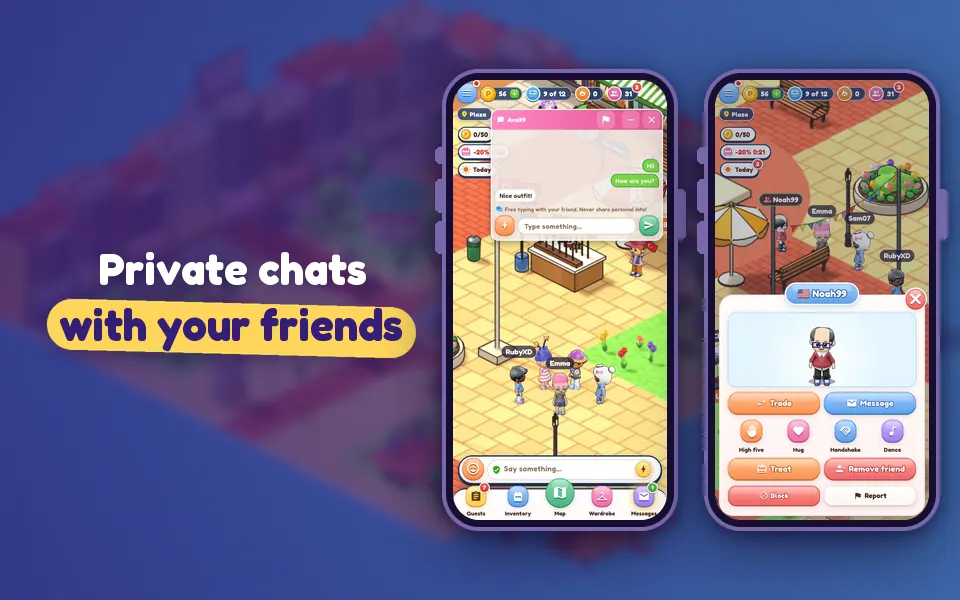
Pembora is a social game: chat on the Plaza, trade high fives, invite your friends home. And you’re always in control.
Adding a friend
- Tap a player in the world; their profile card opens.
- Tap Add friend. If they already sent you a request, the button shows Accept instead.
- Incoming requests show up as a badge on the People button in the top bar; accept or decline them in the Requests tab.
At the bottom of the People panel there’s a “Who can send me friend requests?” setting: Everyone or Nobody. Choose Nobody and new requests stop coming; your current friends stay.
Private messages are friends only
Private messages only work between mutual friends. The Message button on a non-friend’s card is locked. In the People panel’s “Who can message me?” setting you can choose Friends or Nobody. Even in private messages, personal info can’t be shared.
Public chat is safe chat
Public chat only uses approved words. On top of that:
- Long numbers like phone numbers, links, email addresses and social media names aren’t sent: “Personal info can’t be shared”.
- Rude words are blocked.
- Don’t feel like typing? The lightning-bolt Quick phrases button has ready-made greetings, compliments, questions and more.
High fives, hugs, handshakes, dances
The High five, Hug, Handshake and Dance buttons on a profile card send a request. If the other player taps Accept, your characters meet up; if there’s no answer within 30 seconds, the request expires. Turn down a request you don’t want with Decline.
If someone bothers you
At the very bottom of the profile card you’ll find Block and Report. Someone you block can’t message you or send you invites or trades. Our team reviews reports, and the other player never sees who reported them. Step-by-step instructions are in the help center.
Remember: Never share your real name, address, school, phone number, password or social media account with anyone. The Pembora team will never ask for your password.